TRANSCRIPTION • STUDIO CLOUD

Podcast transcription in any language. 

Turn podcasts, interviews, and recordings into searchable text with speaker labels, timestamps, and multilingual transcription built in. 

Included on all paid Studio Cloud plans.
Add intros, outros, and music from any source
No software or DAW required
Original recordings always preserved
Team collaboration and comments built in
HOW IT WORKS

Turn recordings into searchable text in seconds. 

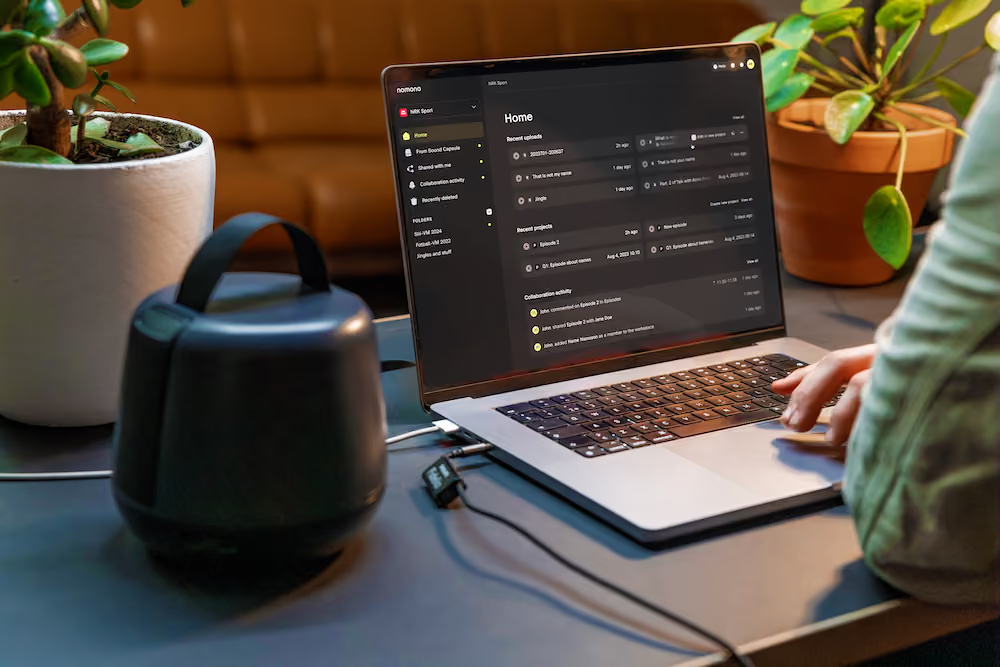
Person editing colorful audio waveforms on a MacBook Pro in a cozy room with plants and a coffee cup.

Transcription is built directly into Studio Cloud, so your recordings are ready to transcribe instantly — no uploads, extra tools, or separate workflow required. 

MORE DETAILS
Transcript follows playback automatically
Click any segment to jump directly to that moment
Automatic language detection built in
Try it free

1. Open any recording

Open any podcast, interview, or recording in the options menu in your Studio Cloud workspace.
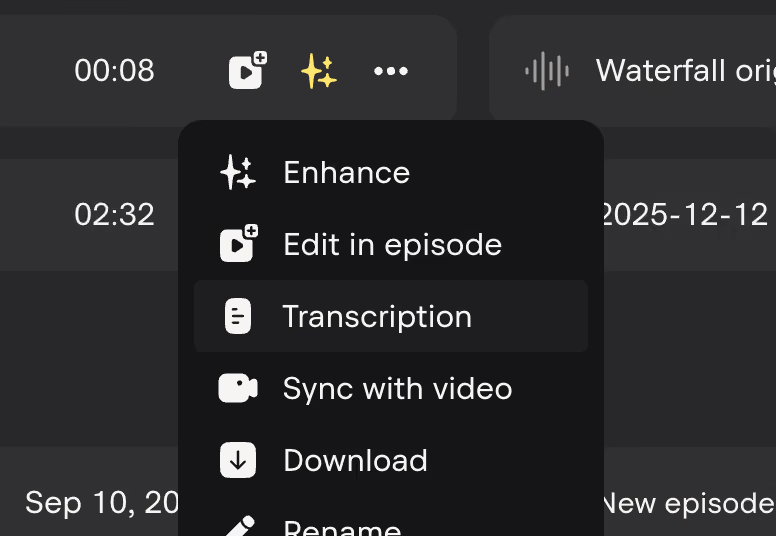
2. Click transcribe

The AI generates a searchable transcript automatically — usually in seconds.
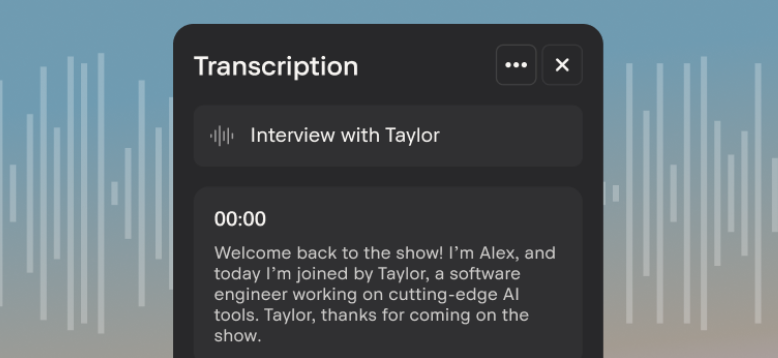
3. Read, navigate and export

Name speakers, navigate by clicking text, download as plain text or SRT, or copy directly into your workflow.
Transcription
Interview with Taylor
00:00 - Alex

00:13 - Taylor

00:22 - Alex

00:34 - Taylor

LIVE VIEW

Follow the transcript. Jump by clicking. 

The transcript panel stays in sync with playback. The active segment highlights as audio plays. Click any line to jump to that exact moment - faster than scrubbing a waveform.

Transcription
Interview with Taylor
00:00 - Alex

00:13 - Taylor

00:22 - Alex

00:34 - Taylor

MORE DETAILS
Ideal for interviews, panels, and podcast recordings
Find quotes instantly without replaying full recordings
Every speaker stays clearly labelled throughout
Start editing
Speaker identification

The AI knows who is speaking.
You give them a name.

Speaker diarization automatically separates voices in podcasts,
interviews, and panel recordings. You simply assign speaker names once.

Voice-based detection

The AI analyses voice characteristics to separate speakers - pitch, timbre, and cadence. No special recording setup required.

WAV or MP3
Broadcast standard loudness

Automatic detection

Name each speaker

Assign names once and every line in the transcript updates automatically with the correct speaker label. 

One-time per recording

Works for any format

Works across interviews, panel discussions, podcasts, and multi-speaker conversations automatically. 

Podcasts • Interviews • Panels

EXPORT FORMATS

Export transcripts, captions, and content instantly.

One transcript. Multiple ways to publish, edit, caption, and repurpose your content. 

.TXT

Plain text

Download or copy the full transcript as clean, readable text. Speaker labels and timestamps included.

MORE DETAILS
Blog posts and articles
Meeting notes and show notes
Social media clips and quotes

.SRT

SRT captions

Generate SRT subtitle files ready for YouTube, Vimeo, Premiere Pro, and social video workflows. 

MORE DETAILS
WAV or MP3
Broadcast standard loudness

COPY

Copy to clipboard

Copy the full transcript directly from the panel. Paste into a doc, email, CMS, or AI tool in one step.

MORE DETAILS
WAV or MP3
Broadcast standard loudness
Multi-language support

Record in any language. Transcribe without switching a setting.

Language detection

Detects the language spoken in your recording automatically.

Detecting language…
English
Norwegian
Spanish
French
German
Portuguese
Italian
Dutch
Swedish
Danish
Polish
Japanese
Korean
Mandarin
Arabic
Turkish
Hindi
Russian

+ many more

The multilingual transcription engine detects the language spoken in your recording and transcribes automatically. No manual language selection, no separate workflow for international content.

MORE DETAILS
Unlimited multilingual transcription across all paid plans
Detects spoken language automatically
Same workflow for every language
Language detection

Detects the language spoken in your recording automatically.

Detecting language…
English
Norwegian
Spanish
French
German
Portuguese
Italian
Dutch
Swedish
Danish
Polish
Japanese
Korean
Mandarin
Arabic
Turkish
Hindi
Russian

+ many more

1

Automatic transcription built directly into your workflow 
BUILT INTO STUDIO CLOUD

Any Language

Detects spoken language automatically with multilingual transcription built in 
Multi-language support

3

ways to export - plain text, SRT captions, or copy to clipboard
TEXT • SRT • COPY

Frequently asked questions

What languages does Nomono support for multilingual transcription support?
Nomono supports multi-language transcription across a wide range of spoken languages with automatic language detection built in. Podcasts, interviews, and recordings are transcribed automatically without changing settings or workflows. Unlimited across all paid plans.
How does transcription with speaker labels work?
Nomono uses AI speaker identification and speaker diarization to automatically separate voices in podcasts, interviews, panels, and conversations. You can then assign speaker names once and labels apply throughout the transcript automatically.
Can I use the transcript to generate captions for video?
Yes. Nomono can generate SRT caption files automatically for podcasts, interviews, YouTube videos, Vimeo uploads, and social content. The timestamps stay synced with the recording for easy subtitle workflows.
Can I edit the transcript after it is generated?
You can rename speakers, copy transcript text, and export transcripts for editing in documents, CMS tools, or AI workflows. Inline transcript editing is currently on the roadmap.
How does Nomono compare to Descript transcription?
Nomono focuses on podcast recording, transcription, speaker identification, captions, and cloud workflows in one platform. It is designed specifically for spoken audio, interviews, and creator workflows.
How long does automatic podcast transcription take?
Most podcast transcription jobs complete in seconds for shorter recordings. Longer interviews and conversations take proportionally longer, but processing runs entirely in the cloud without requiring uploads to third-party tools.
Can I navigate audio using a timestamped transcript?
Yes. Nomono creates a timestamped transcript that stays synced with playback, so you can click any line to jump directly to that moment in the recording.
What plans include transcription?
Podcast transcription is included on all paid Nomono Studio Cloud plans, including Free, Professional, and Premium. The Free plan does not include transcription features.
Is Nomono an alternative to Otter AI for podcast transcription?
Yes. Nomono combines podcast transcription, multilingual transcription, speaker labels, timestamped navigation, captions, and cloud audio workflows in one platform built for spoken content creators.
How do I turn podcast audio into text automatically?
Upload a podcast, interview, or recording into Studio Cloud and Nomono automatically converts the audio to text with speaker labels, timestamps, and multilingual transcription built in.

Your recordings in any language, transcribed.

Generate podcast transcripts, captions, speaker-labelled
text, and multilingual content automatically inside Studio Cloud. 

Shipping and currency

Enjoy free express shipping to the listed locations within 2–5 business days.

Austria flagAustria
Belgium flagBelgium
Bulgaria flagBulgaria
Croatia flagCroatia
Cyprus flagCyprus
Czechia flagCzech Republic
Denmark flagDenmark
Estonia flagEstonia
Finland flagFinland
France flagFrance
Germany flagGermany
Greece flagGreece
Hungary flagHungary
Ireland flagIreland
Italy flagItaly
Latvia flagLatvia
Lithuania flagLithuania
Luxembourg flagLuxembourg
Malta flagMalta
Netherlands flagNetherlands
Norway flagNorway
Poland flagPoland
Portugal flagPortugal
Romania flagRomania
Slovakia flagSlovakia
Slovenia flagSlovenia
Spain flagSpain
Sweden flagSweden
United Kingdom flagUnited Kingdom
United States flagUnited States